
Best AI Image Upscaler: 15 Free & Paid Tools Compared

The best AI image upscaler depends on what you're upscaling. For free, no-signup web upscaling up to 16x, Zoviz Image Upscaler is the easiest pick. Photographers who need maximum detail recovery still reach for Topaz Gigapixel. Anyone working with AI art from Midjourney gets more from Magnific or Krea. Want unlimited upscaling on your own machine? Upscayl, open-source and local, is the answer.
We tested 15 tools on faces, anime, blurry photos, batch jobs, and 8K output. Here's what's actually worth your time.
Your Photo Looks Perfect. Until You Zoom In.
Quick Takeaways
- Real photos need a faithful model. AI art needs a creative one. Mixing them up is the most common mistake we saw.
- Most free tools cap at 4x. A handful reach 16x, but push past that and results start looking plastic no matter the tool.
- Zoviz is the only free browser tool that hits 16x with no watermark and no account.
- Topaz still wins on face detail, but it's subscription-only now.
- For anime, dedicated models (Real-ESRGAN Anime, Waifu2x) beat general-purpose upscalers every time.
- Match your upscale ratio to your target DPI, not the tool's default. Math's below.
A quick comparison
| # | Tool | Best for | Max upscale | Free tier | From |
|---|---|---|---|---|---|
| 1 | Zoviz Image Upscaler | Free, no signup | 16x | Unlimited, no watermark | Free |
| 2 | Topaz Gigapixel AI | Faithful photo detail | 6x (16x tiled) | Trial only | $12/mo |
| 3 | Magnific AI | Creative AI art | 16x | Trial only | $39/mo |
| 4 | Upscayl | Free, local, open source | 4x (16x chained) | Unlimited | Free |
| 5 | Let's Enhance | Multi-model cloud | 16x | 10 credits | $9/mo |
| 6 | VanceAI | Batch processing | 8x | 3 credits/mo | $9.90/mo |
| 7 | BigJPG | Anime, illustration | 8x | 5/day, 3MB max | $9/mo |
Pricing as of May 2026. Free-tier limits shift often, so check each provider's page before you commit.
How AI upscaling works
Old-school resizing stretched pixels and called it done, which is why enlarged photos used to look soft and blocky. AI upscalers instead run the image through a neural network trained on millions of sharp/degraded photo pairs, and predict what the missing detail should look like.
Two approaches dominate right now:
- Super-resolution networks (ESRGAN, Real-ESRGAN, SRGAN) reconstruct detail that's plausibly already there: edges, textures, fine patterns. This is what runs Upscayl, Let's Enhance's Prime and Strong modes, and Zoviz.
- Diffusion-based upscalers (Magnific, the tools inside Krea and Stable Diffusion) use the same tech that generates images from text. They don't just sharpen. They invent new detail. Great for AI art. Risky for real photos, since it can quietly add skin pores or hair that weren't there.
For the full walkthrough with real photos, see our guide on how to enhance and upscale photos with AI.
Faithful vs. creative: pick one
| Faithful | Creative | |
|---|---|---|
| Does | Reconstructs likely detail | Invents new detail via diffusion |
| Best for | Real photos, portraits, product shots | AI art, Midjourney, concept work |
| Risk | Over-smooths fine texture | Changes content you didn't ask to change |
| Tools | Topaz, Upscayl, Let's Enhance Prime, Zoviz | Magnific, Krea, Stable Diffusion upscalers |
Real photo of a real person or product: go faithful. AI-generated or want a stylized reimagining: go creative. Using the wrong one is the single most common mistake people make with these tools.
When to skip upscaling
Not every low-res image needs this.
- Your source already meets the target size. A 1200px original doesn't need upscaling for a 1080px Instagram post.
- The image is too blurry or compressed to have real detail left. AI sharpens what exists. It can't invent focus that was never captured.
- You're about to edit the image further. Upscale after your edits are locked, not before, or you'll blow up the noise along with everything else.
Clear on that? Then match your tool to the content type below.
The 15 best AI image upscalers in 2026
1. Zoviz: best free, no signup

Free, browser-based, and it goes to 16x with no watermark and no account, the highest free ceiling on this list. It uses a faithful super-resolution model, so it's a safe pick for portraits, product shots, and old scans, not for reinventing AI art. Zoviz reports over 1 million images enhanced and a 4.9/5 rating, with uploads encrypted and auto-deleted after processing.
- Best for: anyone who wants a fast, free, browser-based upscale
- Honest trade-off: one model, so no manual switch between faithful and creative modes
- Free tier: unlimited, no watermark
- Paid plans: none needed; it's free
2. Topaz Gigapixel AI: best for pro photographers

Still the benchmark for detail recovery on real photos. Runs locally, uses your GPU, and its face-recovery module beat the strongest free competitor (Upscayl) on roughly 14 of 20 test images in our comparison. The catch: it went subscription-only in 2025.
- Best for: wedding, portrait, and commercial photographers
- Honest trade-off: $12/month for cloud rendering, $199/year for the full Photo AI bundle. Casual users will feel that.
- Free tier: 30-day trial only
- Paid plans: from $12/mo
3. Magnific AI: best for AI art

The leader for creative upscaling. Feed it a 768×768 Midjourney export and it hands back a 4K image full of fabric weave and skin pores that weren't there before. The Creativity slider (Subtle / High / Wild) controls how much it's allowed to invent.
- Best for: AI artists, Midjourney users, concept designers
- Honest trade-off: it will change facial features on real photos, so don't use it there
- Free tier: trial only
- Paid plans: from $39/mo
4. Upscayl - Best free open-source local upscaler

Free forever, no watermark, runs entirely on your machine. Ships with several Real-ESRGAN models, including a dedicated anime variant that's arguably the best free option for that content. Windows, macOS, Linux.
- Best for: privacy-conscious users, anyone with a decent GPU, batch jobs
- Honest trade-off: over-smooths fine textures (hair, grass, fabric) at max zoom compared to Topaz. Invisible at social/web sizes, visible at 24×36 print.
- Free tier: unlimited
- Paid plans: none, donation-supported
Once your image is upscaled, cleanup usually comes next. Our guide to the best AI image editing tools covers what to reach for after that.
5. Let's Enhance: best multi-model cloud tool

Six purpose-built models (Prime, Gentle, Old Photo, Strong, Ultra, Digital Art) plus print-DPI presets and Lightroom/Photoshop plugins. In our testing it produced the most consistent results across photo, illustration, and old-photo content, though Topaz still edges it on the cleanest photographic inputs.
- Best for: mixed workflows needing different models per content type
- Honest trade-off: free tier is just 10 credits/month, and 16x is locked to the Premium plan
- Free tier: 10 credits/mo
- Paid plans: from $9/mo
6. VanceAI: best for batch processing

Built around volume. If you're running hundreds of product photos through Shopify or Etsy listings, this is the workflow it's designed for. Quality on real photos sits a notch below Topaz, roughly on par with Let's Enhance.
- Best for: e-commerce sellers and agencies upscaling many SKUs
- Honest trade-off: free tier is thin (3 credits/mo), and any real volume needs a subscription
- Free tier: 3 credits/mo
- Paid plans: from $9.90/mo
7. Upscale.media: best quick browser upscale
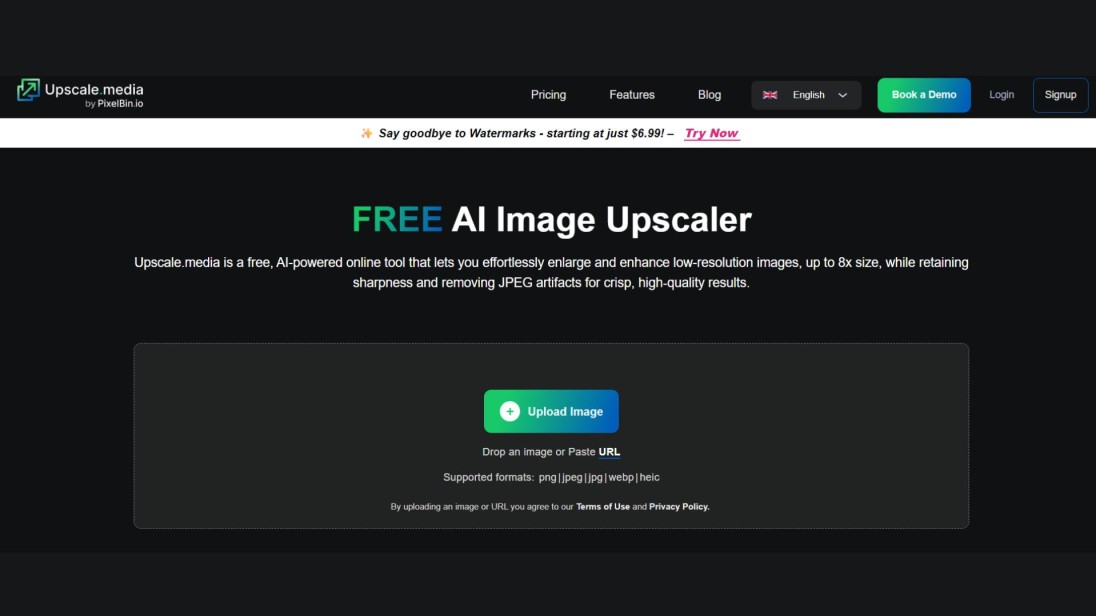
Fast and simple. JPG, PNG, WEBP, HEIC, 2x or 4x, results in seconds. Similar ceiling problem to most free tools: caps at 4x with daily limits on heavier use.
- Best for: one-off browser upscales
- Honest trade-off: tops out at 4x where Zoviz goes to 16x free
- Free tier: limited, browser-based
- Paid plans: from $7/mo
8. ImgUpscaler: best for portraits

Runs a dedicated face-and-eye-detection layer that specifically targets blurry skin, eyes, and lashes. If your typical job is a single face per image, especially a low-light phone photo, this beats general-purpose tools.
- Best for: portraits, headshots, wedding photos
- Honest trade-off: only 3 free upscales a day, and generic (non-portrait) photos look average
- Free tier: 3/day
- Paid plans: from $9.90/mo
If you're starting from scratch rather than fixing an existing photo, our roundup of the best free AI image generators covers where to create the source image before you run it through an upscaler.
9. BigJPG: best for anime and illustration

One of the first tools trained specifically on anime line art, and it still shows: crisp edges, no color bleed, correct dithering. Weak on real photographs, so stick to what it's built for.
- Best for: anime fan art, manga panels, vector illustrations
- Honest trade-off: 3MB free-tier file limit is restrictive, and the UI feels dated
- Free tier: 5/day, 3MB max
- Paid plans: from $9/mo
10. PhotoGrid AI: best mobile-first free option

A mobile photo-editing app with upscaling built in. Solid for social-grade output, no watermark on the free tier. Not built for print or commercial work.
- Best for: phone-first creators, casual social upscaling
- Honest trade-off: capped at 4x, and there's no real desktop counterpart
- Free tier: free, watermark-free
- Paid plans: PhotoGrid Pro upgrade
11. Nero AI: best for Windows desktop

Tucked inside Nero's media suite. Runs locally on Windows, bundles denoising and content-type presets at a fair annual price. Not the sharpest output on this list.
- Best for: Windows users who want extras bundled in
- Honest trade-off: no native macOS app, and quality trails Topaz and Upscayl
- Free tier: limited
- Paid plans: from $39.95/yr
12. Icons8: best for icons and UI graphics

Tuned for graphic design content where edge precision beats photographic detail. Plays well with the Icons8 library. A poor pick for actual photography.
- Best for: designers upscaling icons, UI screenshots, flat illustrations
- Honest trade-off: photographic results lag well behind dedicated photo tools
- Free tier: 3/day
- Paid plans: from $9/mo
If your photo has a distracting object or person you want gone, do that after the upscale, not before. Our guide to introducing tools that remove unwanted objects from photos covers the cleanup step once your image is sharp.
13. Krea AI: best for AI creators

Krea AI is a generative canvas that upscales to 22K resolution with 100 daily compute units free. Best for AI creators already working in Krea's ecosystem.
- Best for: AI creators, generative canvas workflows
- Honest trade-off: heaviest models sit behind paid tiers
- Free tier: 100 daily units
- Paid plans: paid tiers for top-end models
14. Adobe Firefly: best for existing Creative Cloud users

Adobe Firefly's Generative Upscale (in Photoshop) is a solid 4x option if you're already in Creative Cloud, and mediocre reason to buy in on its own.
- Best for: existing Adobe Creative Cloud users
- Honest trade-off: capped at 4x, gated behind limited Firefly credits
- Free tier: limited credits
- Paid plans: included in CC
15. Waifu2x: best for free anime and line-art upscaling

Waifu2x is the free, no-frills option for anime and line art specifically, 2x per pass, fully free.
- Best for: free anime and line-art upscaling
- Honest trade-off: only 2x per pass, so you'll chain multiple runs for anything bigger
- Free tier: unlimited
- Paid plans: none
Best pick by use case
| Use case | Best free | Best paid |
|---|---|---|
| Faces & portraits | Zoviz, ImgUpscaler | Topaz Gigapixel |
| Anime & illustration | Upscayl (Anime model), BigJPG | Magnific |
| Photographers (RAW) | Upscayl | Topaz Gigapixel |
| 8K & ultra-high res | Zoviz, Upscayl (chained) | Let's Enhance, Magnific |
| Blurry, low-res photos | Zoviz | Topaz (Low Resolution model) |
| Batch / e-commerce | Upscayl (local batch) | VanceAI, Topaz |
| AI-generated images | Krea, Upscayl Anime | Magnific |
| Old-photo restoration | Zoviz, Upscayl | Let's Enhance (Old Photo model) |
| Print at 300 DPI | Zoviz, Upscayl | Let's Enhance, Topaz |
VanceAI vs Upscayl vs BigJPG vs Let's Enhance vs Zoviz
The five tools people compare most often. Side by side:
| Zoviz | Upscayl | VanceAI | BigJPG | Let's Enhance | |
|---|---|---|---|---|---|
| Type | Web | Local desktop | Web + API | Web | Web + API |
| Max upscale | 16x | 4x (chainable) | 8x | 8x | 16x |
| Free tier | Unlimited | Unlimited | 3 credits/mo | 5/day | 10 credits/mo |
| Best at | Real photos | Anime + photos | Batch, real photos | Anime, line art | Mixed content |
| Account needed | No | No | Yes | Yes | Yes |
| Entry price | Free | Free | $9.90/mo | $9/mo | $9/mo |
Need it free and instant? Zoviz. Privacy-paranoid or need unlimited local batch? Upscayl. Running 500 product shots a week? Zoviz or VanceAI. Fan art or manga? Zoviz, BigJPG, or Upscayl Anime.
4 things to check before you trust the result
Zoom to 100% on your own output, not the homepage screenshot. Watch for:
- Haloing: bright, unnatural edges around high-contrast objects
- Over-smoothing: skin or fabric that reads plasticky instead of textured
- Text blur: letters losing crispness, the first thing to check if your image has a logo
- Color shifts: subtle hue or saturation changes, most visible on skin tones
See any of these? Drop the ratio one notch, or switch from a creative model to a faithful one.
What resolution do you actually need?
| Use case | Target resolution | Upscale needed from 1000×1000 |
|---|---|---|
| Instagram post | 1080 × 1080 | None |
| YouTube thumbnail | 1280 × 720 | 1.3x |
| 4K web/TV | 3840 × 2160 | 4x |
| 8K display | 7680 × 4320 | 8x |
| 4×6 print (300 DPI) | 1200 × 1800 | 2x |
| 8×10 print (300 DPI) | 2400 × 3000 | 3x |
| 16×20 poster (300 DPI) | 4800 × 6000 | 6x |
| 24×36 poster (300 DPI) | 7200 × 10800 | 11x |
Rule of thumb:
300 DPI needs 300 pixels per printed inch. Divide target pixels by source pixels to get your ratio. Most casual prints up to 11×14 need just 4x. Posters need 8x to 16x, which is where Zoviz's ceiling matters.
Final verdict
There's no single best upscaler in 2026, just the best one for your image. Real photo: go faithful. AI art: go creative. Don't want to install anything, sign up, or pay? Zoviz Image Upscaler is the only free browser tool with a 16x ceiling and no watermark.
FAQs
Is there a completely free upscaler with no signup, no watermark, up to 4K or 8K?
Yes. Zoviz hits all four at once, up to 16x. Upscayl matches it for free but needs a desktop install. Most tools marketed as "free" still watermark, require an account, or cap you at 3 to 5 images a day.
What's the difference between AI upscaling and old-school enlargement?
Bicubic interpolation averages nearby pixels, which is why it looks soft. AI upscalers use neural networks trained on millions of images to predict real detail, so results look sharp instead of stretched.
Can I upscale Midjourney or Stable Diffusion images?
Yes, but use a creative upscaler (Magnific, Krea), not a faithful one. Faithful tools are built for real photos.
Is AI upscaling good enough for 300 DPI printing?
Yes. 8x to 16x scaling from a 1080p source covers prints up to 16×20 and beyond. For gallery or commercial prints, pros still pair Topaz with RAW files.
How much can AI actually upscale an image?
Most tools cap at 4x to 8x per pass. Zoviz and Magnific reach 16x directly; Upscayl chains 4x passes to get there. Past roughly 16x, the AI is inventing more than recovering.
Does upscaling hurt image quality?
Not if used right. Problems come from starting too blurry, overshooting the ratio, or using a creative model on a real photo.
Can AI fix a blurry photo?
Partially. It sharpens soft focus but can't recover detail that was never captured. Topaz's Low Resolution model and Let's Enhance's Strong model handle this best paid; Zoviz handles mild blur free.
Best upscaler for faces?
Free: Zoviz or ImgUpscaler. Paid: Topaz's face-recovery module.
Best upscaler for anime?
Upscayl's Real-ESRGAN Anime model, free. BigJPG is a close second. Magnific for creative stylized reimagining.
Are AI upscalers safe with my images?
Reputable ones encrypt and auto-delete after processing. Zoviz never stores or shares uploads. For maximum privacy, use a local tool like Upscayl or Topaz.
限定ニュースレターを受け取る
最新情報をメールで直接受け取るために、今すぐご登録ください。お見逃しなく!
あなたへのおすすめ



Zovizのロゴメーカーを試す
ブランド名を入力すると、数秒でロゴの選択肢が表示されます。


