If you've ever tried to make a quick ID card and ended up spending an hour fighting a template, you're not alone. Gone are the days when you needed a graphic designer or advanced Photoshop skills.
The good news is that free online ID card makers have gotten genuinely good over the past couple of years. AI tools can now auto-fill your brand colors, remove a photo background in seconds, and spit out a print-ready card without you touching a single design setting.
Before we explore the list of top-performing ID card makers online, let us check out their market size. The Student smart ID card market size was around USD 6.76 billion globally till 2023. It is projected to grow at a CAGR of 4% and reach USD 8.9 billion by 2030. (Source: Virtuemarketresearch)
With the ID card software comes the hardware, i.e., the ID card printer. The market size of the ID card printer is projected to reach 2.91 USD Billion by 203,5, growing at a CAGR of 5.28% (2025-2035). (Source: Marketresearchfuture)
What AI Actually Does in These Tools
I want to be honest here, because a lot of tools throw 'AI-powered' on their homepage without it meaning much. So here's what AI actually does well in ID card generators right now:
- Background remover: This one is genuinely useful. Upload a photo and the AI cuts out the background cleanly, usually in under five seconds. A year ago this was a paid feature on most platforms.
- Brand kit generator: Tools like Zoviz can scan your logo and pull out your brand colors, then apply them to your ID card template and all other brand assets automatically. It's not magic, but it does save you from eyedropper-ing your hex code manually.
- ID Generator Templates: Some tools like Zoviz can rearrange text and image zones based on what type of card you're making between a lot of unique customized layouts.
10 Free Online ID Card Makers
I've ranked these roughly by how well they handle the full workflow; not just the design step but getting to a usable, downloadable card.
1. Zoviz ID Card Maker

Zoviz is purpose-built ID cards maker, not adapted from a general design tool. Upload your logo, set your brand color, and it generates on-brand templates in seconds, like the example in this screenshot. Photo upload, background removal, QR codes, and bulk creation are all in one place.
Top Features
- Professional ID card templates for businesses, schools, events, and more.
- AI branding syncs your logo and color.
- Drag-and-drop customization with an advanced editor.
- High-resolution JPG download.
- No signup or credit card required to preview the design.
2. Canva

A free and popular design tool with pre-made ID card templates for students, press, officers, etc. The template library is large and the editor is beginner-friendly. While Canva is great for beginners, some elements are available only in the Pro plan.
Top Features
- Free AI tools for customization.
- 1000+ ID card templates, elements, and photos.
- Share your design directly to social media platforms.
- Collaborate with your team on any design.
- Export in JPG, PNG, PDF, GIF, and MP4.
Which one is Better? For a single card, Canva is fine. For anything that needs consistent branding across a team, Zoviz is a faster workflow since sizing, photo upload, and brand sync are all built in rather than done manually.
3. Design.com

Design.com is an easy-to-use design platform that helps users create professional ID cards using customizable templates and AI-assisted tools. Good fit if you're already using it for other brand assets and want everything in one place.
Top Features
- AI-assisted design for faster customization
- Ready-made templates for ID cards and brand assets
- Simple editor for text, colors, and layout adjustments
- Supports consistent branding across designs
- Professional logos included in ID card designs or upload your own
- High-quality downloads for print and digital use
Read More: Best AI Image Upscaler Tools
4. BrandCrowd

BrandCrowd offers a wide range of templates and design assets that make it easy to create customized ID cards. It’s useful for users who want more design variety and control over styling.
Top Features
- Large template library for ID cards and branding
- Customization options for fonts, colors, and elements
- Access to icons and graphics for personalization
- High-resolution files for printing
- Additional tools for creating other brand assets
5. Adobe Express
Polished design experience with strong typography controls. Best if you're already in the Adobe ecosystem, not recommended for beginners who have no technical expertise.
Top Features
- Professional-grade typography.
- Templates for corporate ID cards.
- Access to Adobe Stock images.
- Integration with other Adobe apps.
- Free AI features for beginners.
6. IDCreator

Purpose-built for ID and badge production. You're not here for creative design; you're here because you need physical cards with security features ordered and shipped.
Top Features
- Focused on ID and badge designs.
- Order printed cards directly.
- Supports barcodes and QR codes.
- Cloud storage for saving your designs.
- Customizable security features.
Read More: Best AI Logo Generators
7. Visme

Primarily a presentation and infographic tool, but it has stylish ID card templates and an ordering service. Worth it if you're already a Visme user; overkill if you just need a card.
Top Features
- Custom ID card templates.
- Card quality selection.
- Drag-and-drop interface.
- Advanced chart and graphic options.
- All-in-one design and printing solution.
8. Edit.org

No account, no learning curve. Pick a template, edit the text, upload a photo, download as PDF. The whole thing takes a few minutes. Not much room for brand customization, but that's the point.
Top Features
- Free ID card templates, no signup required
- PDF, PNG, and JPG export
- Fully browser-based, nothing to install
9. Robolly

Built for one thing: generating hundreds of ID cards automatically from a spreadsheet. Upload your data (names, photos, roles, departments) and it produces all of them in one go. Setup takes some effort but the time savings are substantial at scale.
Top Features
- Automated ID generation from spreadsheet data
- Data merge for names, photos, roles, and departments
- High-resolution PDF, PNG, JPG export
- Reusable template layouts
10. CapCut

Known for video editing, but its online image editor handles ID cards well. The AI background removal is fast and clean. Templates lean more creative than corporate, which works well for event passes and student badges.
Top Features
- Built-in ID card templates
- AI background removal for photos
- Portrait retouching and text effects
- Free plan available
Comparison Table: Best ID Card Creators
| Tool | Free Plan | Paid From | AI Features | Photo Upload | Bulk | Best For |
|---|---|---|---|---|---|---|
| Zoviz | Yes | $49.99 kit | Yes, full | Yes, built-in | Yes (paid) | Businesses, schools, events |
| Canva | Yes | $12.99/mo | Yes | Yes | No | Beginners, small teams |
| Design.com | Yes | $5/mo | Yes | Yes | Limited | Businesses, organizations |
| BrandCrowd | Yes | $3/mo | Limited | Yes | No | Design variety seekers |
| Adobe Express | Yes | $9.99/mo | Yes | Yes | No | Adobe ecosystem users |
| IDCreator | Limited | ~$8/card | No | Yes | Yes | Professional, press, medical |
| Visme | Yes | $12.25/mo | Limited | Yes | No | Teams and marketers |
| Edit.org | Yes | Asset upgrades | No | Yes | No | Fast one-off cards |
| Robolly | No | Custom | Yes | Yes | Yes | Bulk / enterprise |
| CapCut | Yes | Free+ | Yes (BG) | Yes | No | Content creators |
How to Create an ID Card Using AI? (Step-by-step)
I'm walking through Zoviz here because it has a clear step-by-step workflow. Most tools on this list follow a similar process.
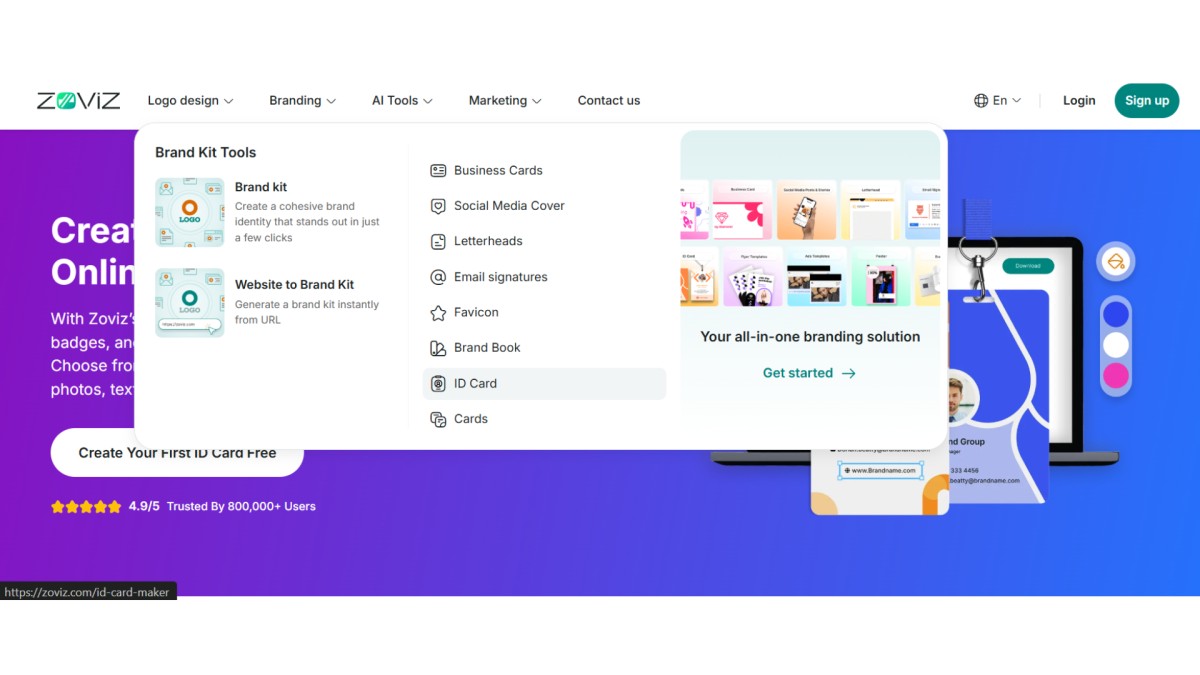
Step 1: Visit the Zoviz official website and hover over the Main Menu > Branding > ID Card or Click on the link below.
Step 2: This will take you to the ID card maker landing page. To create your first ID card, click on the “Create Your First ID Card Free” button.

Step 3: What makes the Zoviz ID card-making process different from other tools is its logo uploading process. If you do not have a logo, you can create a new one in minutes using its free AI logo maker. Click on Upload Your Logo button and choose the logo file from your local computer.
Once you upload the logo file, you can crop it or even remove the background for free. Without editing the logo file, you can go ahead with the next steps.
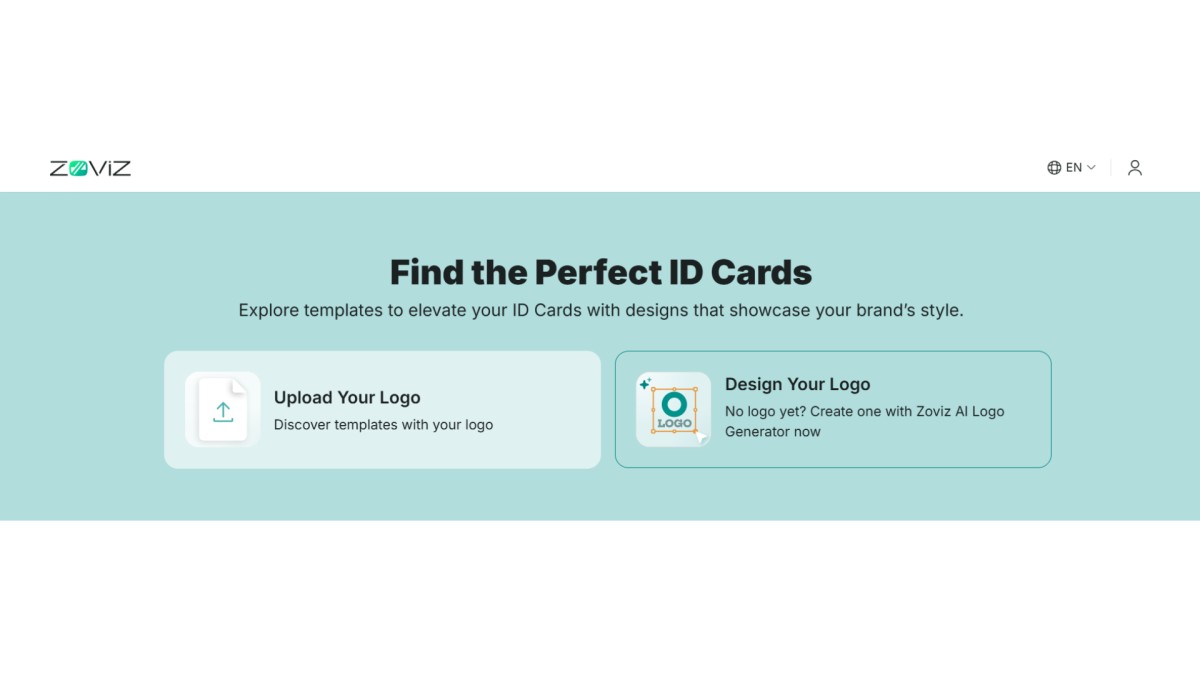
Now, select your brand’s primary color to align with your branding needs. Finally, enter your brand name and wait for the results.
Step 4: Zoviz generates a set of ID card templates based on your branding. Pick the one closest to what you need. From there you can edit it in the drag-and-drop editor; adjust text fields, add a photo, change fonts, insert a QR code, whatever you need.

Step 5: Preview the card. If it looks good, download it (high-resolution JPG). For free plan users the preview is available immediately; full-resolution export requires the paid plan.
Conclusion
Most people don't need a complicated tool for ID cards. A free plan on Zoviz or Canva will handle the majority of use cases. Where it gets more interesting is when you need volume (Robolly), security features (IDCreator), or you're already deep in a specific ecosystem like Adobe or CapCut.
If you're not sure where to start, go with Zoviz. It's the only tool here that's genuinely built around the unique templates and integrated workflow, rather than bolted onto a general design platform.
FAQs | Top online Identity card maker with photo
What is the best free online ID card maker in 2026?
For most people, Zoviz is the best starting point. It's free to use, has a clean AI-powered workflow, and the templates are actually built for ID cards rather than adapted from general design templates. If you need a fast one-off card without any setup, Edit.org is worth a look. For bulk generation, Robolly.
Can I make an ID card online with a photo upload?
Yes, all the tools on this list support photo upload. Zoviz, Canva, IDCreator, Adobe Express, and Edit.org all let you upload a photo and place it on the card. Zoviz and CapCut both include background removal in the same editor, which saves you from needing a separate step.
What is the best AI ID card maker?
Zoviz has the most complete AI integration specifically for ID cards. It auto-syncs branding, suggests layouts, and handles background removal. If you're producing cards at scale from a dataset, Robolly's automation is the better fit. CapCut's AI background removal is also genuinely good if you're starting from a portrait photo.
Is there a free ID card maker for students?
Yes. Zoviz, Canva, and Edit.org all work for student IDs on their free plans. You can add a student photo, name, roll number, and institution name, and export in a print-ready format without entering any card details.
What's the difference between an ID card maker and an ID card generator?
An ID card maker gives you a full editor; templates, drag-and-drop, photo upload, manual customization. You control everything. An ID card generator creates cards automatically from data you feed it (a spreadsheet of names, photos, roles).
Can I create an ID card online without installing anything?
Yes. Every tool on this list runs in your browser. Zoviz, Canva, Design.com, Edit.org, Adobe Express, and CapCut all work without downloading or installing software. IDCreator is also fully browser-based.